
About
Tapir is an AI agent coding assistant that runs in your terminal. Built in Rust, it connects to the Anthropic API to orchestrate AI agents through complex software engineering tasks.
Tapir is probably not for you if you think a good tool needs an Electron app, a plugin marketplace, and a few gigabytes of RAM. The binary is under 1MB. At runtime it uses a few megabytes of resident memory — not gigabytes:
Tapir does not ask for permission before executing tools — it reads, writes, and runs commands as instructed by the model. The recommended way to run it is inside an isolated environment such as a container, so the agent can operate freely without risk to your host system.
All four tools below were given the same task: "read @Cargo.toml and return the dependencies list". Here is how much memory each one used:
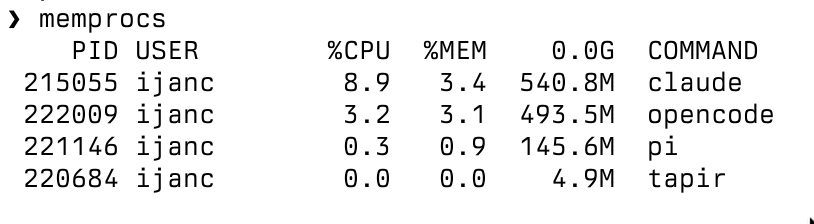
No frameworks. No garbage collector. No runtime. Just ~5500 lines of Rust that talk to an API and edit your files.
Features
- Streaming responses — real-time token output with a thinking timer
- Tool execution — read, write, edit files, bash, ls, find, grep — run in parallel
- Session management — persist and resume conversations across sessions
- Context files — auto-load AGENTS.md, CLAUDE.md, and custom system prompts
- Skill system — discover and load skills from project, user, and global directories
- Conversation compaction — automatic summarization when context gets large
- Extended thinking — configurable thinking budget for complex reasoning
- Shell escapes —
!cmdsends output to the LLM,!!cmdruns locally - Ctrl+C handling — interrupt responses or tool execution cleanly
- Collapsible tool output — toggle with Ctrl+O to keep your terminal clean
- Tab completion — complete @file paths in the input line
- HTTP retry with backoff — automatic retry on transient API errors
- Static binary — single musl binary under 900KB, zero dependencies
Setup
Tapir connects to the Anthropic API by default. Set your API key as an environment variable:
export ANTHROPIC_API_KEY="sk-ant-..."
To use a different provider or endpoint (e.g. a local proxy), override the API URL:
export TAPIR_API_URL="https://your-provider.example.com/v1/messages"
You can also configure the model and token limits:
ANTHROPIC_API_KEY- API key (required)
TAPIR_MODEL- Model ID (default:
claude-opus-4-6) TAPIR_MAX_TOKENS- Max response tokens (default:
16384) TAPIR_THINKING_BUDGET- Extended thinking budget, 0 = off (default:
0) TAPIR_API_URL- API endpoint (default:
https://api.anthropic.com/v1/messages)
Environment variables take priority over the config file.
Configuration
Tapir reads a JSON config file from ~/.tapir/config.json.
You can specify a custom path with tapir -c /path/to/config.json.
{
  "api_key": "sk-ant-...",
  "model": "claude-sonnet-4-6",
  "max_tokens": 8192,
  "thinking_budget": 10000,
  "api_url": "https://api.anthropic.com/v1/messages",
  "skills": ["~/.tapir/agent/skills", "/project/extra-skills"]
}
All fields are optional. Missing values fall back to environment variables, then to defaults.
Custom models
Register models with context window and cost info via the
_models field:
{
  "_models": {
    "claude-sonnet-4-6": {
      "context": 200000,
      "max_output": 16384,
      "input_cost_per_m": 3.0,
      "output_cost_per_m": 15.0,
      "extended_thinking": true
    }
  }
}
System prompts
Tapir assembles the system prompt from multiple sources, in order:
- Base prompt —
.tapir/SYSTEM.mdin the working directory, or~/.tapir/agent/SYSTEM.mdglobally - Append —
.tapir/APPEND_SYSTEM.md(project) and~/.tapir/agent/APPEND_SYSTEM.md(global) - Context files —
AGENTS.mdorCLAUDE.mddiscovered from the home directory down to the working directory - Skills — loaded from
~/.tapir/agent/skills/,.agents/skills/,.tapir/skills/, and paths listed inconfig.json
Directory layout
~/.tapir/
  config.json          # global configuration
  history              # command history
  sessions/            # persisted sessions
  agent/
    SYSTEM.md          # global system prompt
    APPEND_SYSTEM.md   # appended to system prompt
    AGENTS.md          # global context
    skills/            # global skills

<project>/
  .tapir/
    SYSTEM.md          # project system prompt
    APPEND_SYSTEM.md   # project append
    skills/            # project skills
  .agents/
    skills/            # alternative skills location
  AGENTS.md            # project context
Running in a container
Since Tapir executes tools without confirmation prompts, running it inside a container keeps your host safe. Here is a minimal example using Alpine Linux:
Dockerfile
FROM alpine:latest

RUN apk add --no-cache git curl bash coreutils findutils grep

# Copy the static musl binary
COPY tapir /usr/local/bin/tapir
RUN chmod +x /usr/local/bin/tapir

# Create a non-root user
RUN adduser -D dev
USER dev
WORKDIR /home/dev/project
Build and run
# Build the image
docker build -t tapir-sandbox .

# Run with your API key and project mounted
docker run -it --rm \
  -e ANTHROPIC_API_KEY="$ANTHROPIC_API_KEY" \
  -v "$PWD":/home/dev/project \
  tapir-sandbox tapir
The -v flag mounts your project directory into the container.
Tapir can read and modify those files, but cannot touch anything else on your
host. When you are done, the container is discarded (--rm).
Tips
- Use the static musl binary — it runs on Alpine without extra libraries
- Add project-specific tools to the image (e.g.
apk add python3 nodejs go) so the agent can build and test your code - Mount
~/.tapiras a volume if you want to persist sessions and history across runs - For extra isolation, drop capabilities with
--cap-drop=ALLand disable networking with--network=nonewhen the agent does not need internet access. The next release will support Ollama as a provider — you will be able to restrict the container's network to only reach your local Ollama instance, keeping the agent fully air-gapped from the internet
Commands
Slash commands
| Command | Description |
|---|---|
/help | Display help message |
/quit, /exit | Exit tapir |
/new | Start a new session |
/resume | Resume the last session (before first prompt) |
/name [name] | Show or set session display name |
/session | Display current session info (model, tokens, cost) |
/model [name] | Show available models or switch model |
/hotkeys | Display keyboard shortcuts |
/skills | List available skills |
/skill:name [args] | Load and execute a skill |
Shell escapes
| Command | Description |
|---|---|
!cmd | Run shell command, send output to the LLM |
!!cmd | Run shell command locally (output not sent) |
Keyboard shortcuts
| Key | Action |
|---|---|
Enter | Submit input |
Tab | Auto-complete @file paths |
Ctrl-C | Cancel current line / interrupt response |
Ctrl-D | Quit (on empty line) |
Ctrl-O | Toggle tool output visibility |
Ctrl-G | Open external editor ($VISUAL or $EDITOR) |
Ctrl-A / Home | Move to beginning of line |
Ctrl-E / End | Move to end of line |
Ctrl-U | Clear entire line |
Ctrl-K | Delete to end of line |
Ctrl-W | Delete word backward |
Up / Ctrl-P | Previous history entry |
Down / Ctrl-N | Next history entry |
Ctrl-Left / Ctrl-Right | Move by word |
FAQ
Does Tapir support MCP?
No, and that is by design. The Model Context Protocol injects tool descriptions into the system prompt on every request, which inflates token usage significantly — even when those tools are never called. Tapir ships a fixed, minimal set of tools (read, write, edit, bash, ls, find, grep) that cover the vast majority of coding tasks. No protocol negotiation, no tool registries, no surprise token bills.
Is there a plan mode?
No. Just ask the agent to make one:
> Read the codebase and write a detailed implementation plan to PLAN.md
The agent will explore the project, reason about it, and save the plan to a file you can review, edit, and feed back in a later session. A plain markdown file is more portable and more useful than a built-in mode you cannot version-control.
Is there a todo list?
No. Same idea — ask the agent:
> Read TODO.md, pick the next item, implement it, and update the list
A TODO.md in your repo is grep-able, diff-able, and visible in
every tool you already use. No proprietary format, no hidden state.
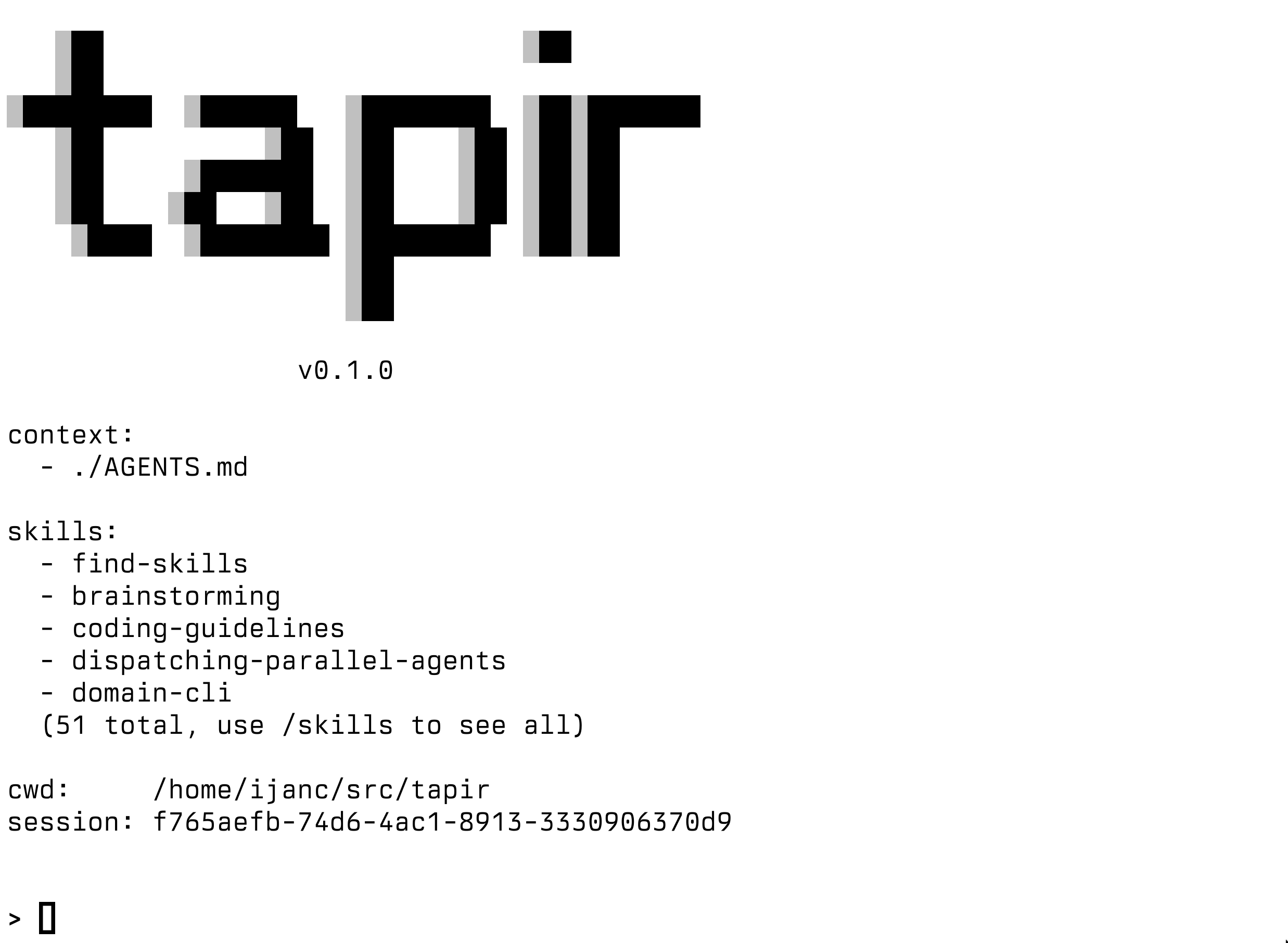
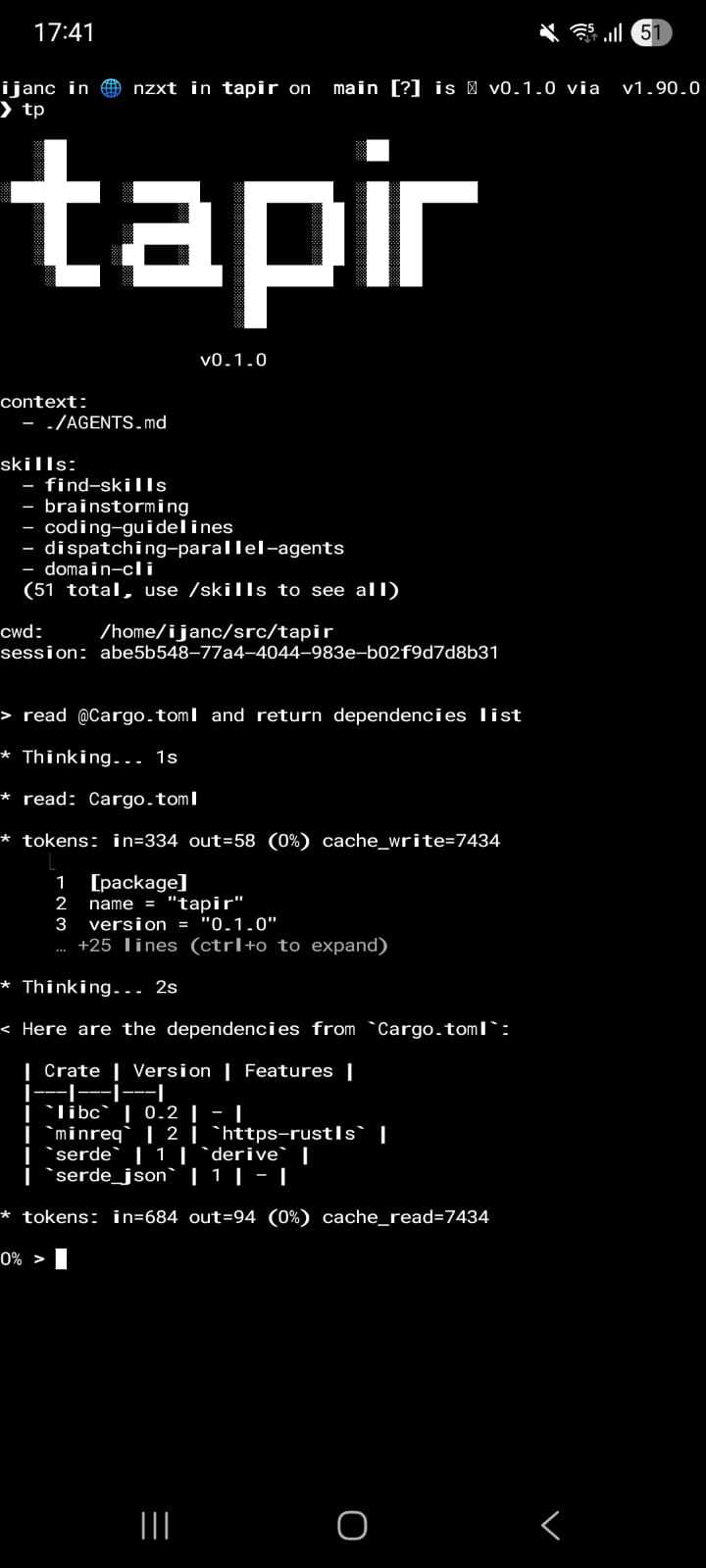
Screenshot
Download
v0.1.0
Linux x86_64 binaries:
- tapir-0.1.0-x86_64-linux-musl.tar.gz — static (musl libc)
- tapir-0.1.0-x86_64-linux-musl.zip
- tapir-0.1.0-x86_64-linux-gnu.tar.gz — dynamically linked (glibc)
- tapir-0.1.0-x86_64-linux-gnu.zip
Packages:
- tapir_0.1.0-1_amd64.deb — Debian/Ubuntu
- tapir-0.1.0-1-x86_64.pkg.tar.zst — Arch Linux
Source code:
Verification:
- SHA256
- SHA256.sig
- tapir-010.pub — signify public key
signify -V -p tapir-010.pub -m SHA256 -x SHA256.sig
sha256sum -c SHA256
Source Code
License
ISC License

Copyright (c) 2025-2026 Murilo Ijanc <murilo@ijanc.org>

Permission to use, copy, modify, and/or distribute this software for any
purpose with or without fee is hereby granted, provided that the above
copyright notice and this permission notice appear in all copies.

THE SOFTWARE IS PROVIDED "AS IS" AND THE AUTHOR DISCLAIMS ALL WARRANTIES
WITH REGARD TO THIS SOFTWARE INCLUDING ALL IMPLIED WARRANTIES OF
MERCHANTABILITY AND FITNESS. IN NO EVENT SHALL THE AUTHOR BE LIABLE FOR
ANY SPECIAL, DIRECT, INDIRECT, OR CONSEQUENTIAL DAMAGES OR ANY DAMAGES
WHATSOEVER RESULTING FROM LOSS OF USE, DATA OR PROFITS, WHETHER IN AN
ACTION OF CONTRACT, NEGLIGENCE OR OTHER TORTIOUS ACTION, ARISING OUT OF
OR IN CONNECTION WITH THE USE OR PERFORMANCE OF THIS SOFTWARE.